SkipLegal
Timeline
3 months
Results
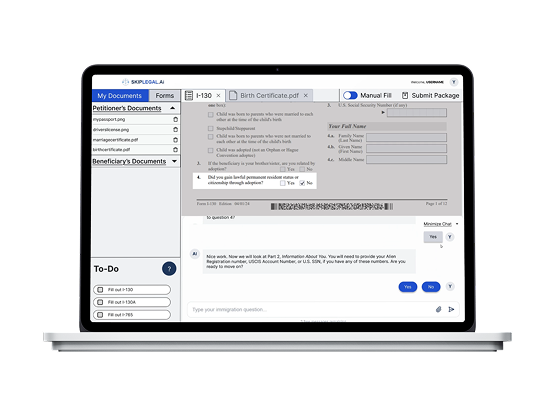
- Figma Prototype of AI assistance on filling out immigration documents
Discovery
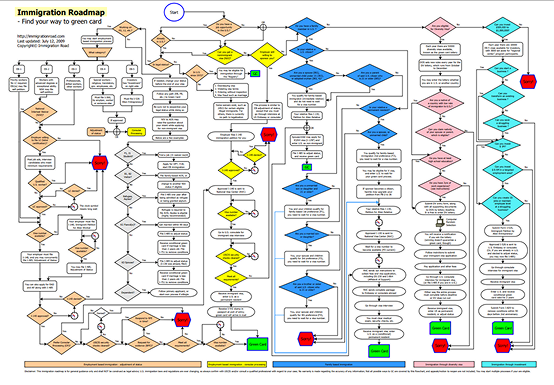
Immigration to the U.S. is a complicated bureaucratic process, where small mistakes can cost months of time and thousands in dollars. Any prospective immigrant is juggling several critical documents, navigating a chain of complicated forms, and balancing the endless combination of potential outcomes.
AI can be used as a tool to keep documents organized, track tasks, minimize error, and manage the entire process.
SkipLegal’s founder came to our team requesting a proof of concept with a focus on 3 key factors:
- Identify the needs of a diverse immigrant userbase
- Validate the need for AI-powered assistance in immigration processes
- Deliver an MVP showing how AI can be leveraged to assist with immigration law
Research
To define how AI should be integrated into the immigration workflow, we conducted qualitative interviews with 4 target users, and designed and analyzed results from a quantitative survey of over 100 respondents. Our data revealed 3 key insights:
Immigration paperwork is overwhelming and repetitive, even with professional assistance.
Trust in AI is conditional. Users want transparency and proof that the AI is correct.
Users expect visible security features to protect their data.
Problem
How might we design an AI-powered service that is trustworthy and helps bridge the gap between the U.S. government, aspiring immigrants, and lawyers?
Wireframes
Questionnaire
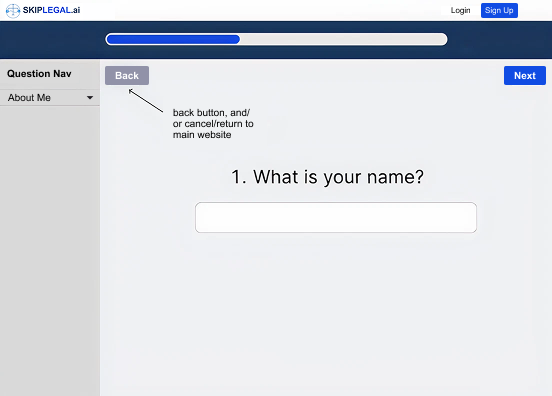
I deliberately chose to present questions one at a time to counter the complexity of immigration terminology. Isolating each question reduced cognitive load at a critical moment in the onboarding process, where the user decides if they trust the product enough to continue.
Form assistance
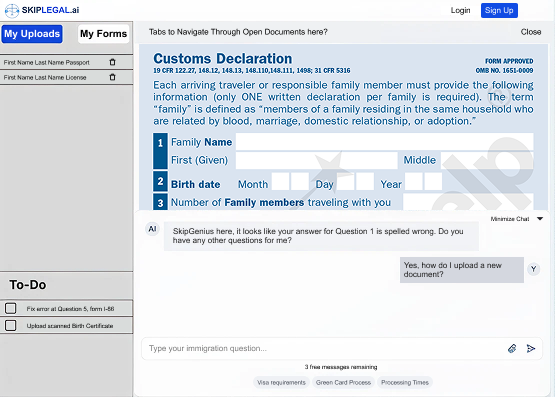
The bento box layout keeps four distinct functions on hand: document & form management, task list, form viewing, and AI assistance. It is always easy for a user to see where they are in the process, reducing anxiety about feeling lost.
Usability Testing
Testing the wireframes identified three failure points.
Unknown Terminology
Insight
Immigration terminology produced hesitation at a critical point where the product needed to build trust and confidence.
Action
We delivered more value to users by incorporating definitions through hover interactions. This eliminates the need to jump between tabs to look up definitions, reducing mental load and keeping the focus within SkipLegal.
Information Overload
Insight
The bento layout overwhelmed users after completing the questionnaire. Too much information was introduced at once.
Action
A tutorial introducing each panel and its function orients users and primes their mental model of SkipLegal. This also continues the one-by-one flow used by the onboarding questionnaire.
Trust in AI
Insight
Participants were doubtful of SkipGenius' ability to fill out forms accurately, and did not feel in control of their information.
Action
Giving users the option to choose between "autofill" and "manual" mode helped them feel more agency over the process. Manual mode used SkipGenius minimally and darkened the form viewport to focus on only one question at a time. Autofill included a clear modal explaining what SkipGenius will do and how to enhance its results.
Final Prototype & Presentation
Outcome & Reflection
SkipLegal was completed in Spring 2025, deep into what will likely be remembered as the early inflection point of mainstream AI adoption. Designing an AI-powered product during that moment came with a specific tension: AI was simultaneously everywhere and nowhere people fully trusted yet.
The interface isn’t just communicating what the product does — it’s making an argument for why the user should believe it. Trust isn’t assumed; it has to be constructed deliberately through transparency, consistency, and control.
The 37% improvement in trust ratings between testing rounds reinforced something I think will define good AI product design for years to come: users don’t distrust AI because it makes mistakes — they distrust it because they can’t tell when it might. Designing for that uncertainty is where human factors thinking becomes most valuable in an AI context.